

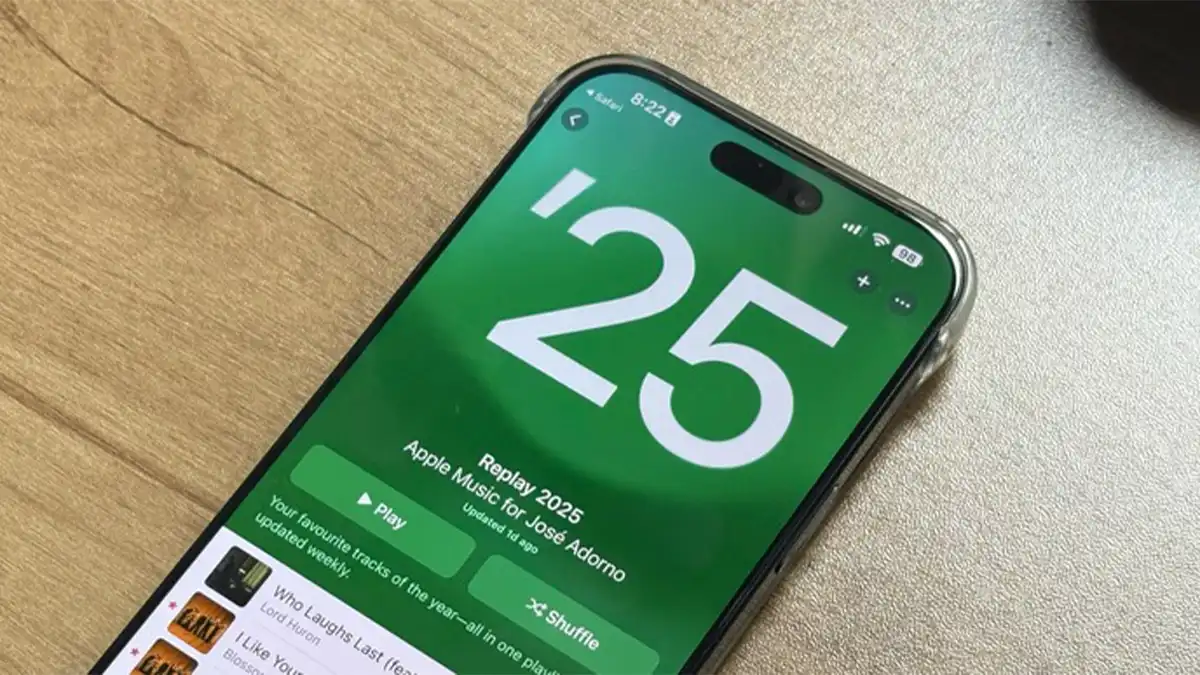

Music defines moments — from road-trip sing-alongs to late-night chill sessions. If you use Apple Music regularly, then Apple Music Replay 2025 is your chance to look back at the soundtrack of your year. It’s a personalized wrap-up of your listening habits: top songs, favorite artists, most-played albums, total listening time, and more. In 2025, Replay is bigger and more detailed than ever — giving subscribers a thorough, shareable reflection of their musical journey.
What Exactly Is Apple Music Replay?
Replay is Apple Music’s annual summary of your streaming history. It compiles data like:
- Your top 100 most-played songs of the year
- The artists, albums, genres you listened to most
- Total minutes or hours spent listening
- Number of different artists you discovered
- Your favorite genres and listening trends over time
But Replay isn’t just a playlist — it’s a full overview. In 2025, Apple expanded the analytics: now you get more detailed insight into listening patterns, returning favorites, genre breakdowns, and a shareable “highlight reel.”
Apple Music has been offering Replay since 2019, but over the years it has evolved from a simple “top songs” list to a polished annual wrap-up with stats, visuals, and social-ready sharing.
What’s New in 2025 — Replay Gets an Upgrade
This year’s Replay brings some of the most robust features yet:
- A fully updated year-end experience, live in the Apple Music app and online — meaning no need for external websites or workarounds.
- A “Highlight Reel” with visuals summarizing your top songs, artists, and listening stats — perfect for sharing on social media like Instagram or TikTok.
- Detailed metrics: not just “top songs,” but total listening time, number of artists listened to, top genres, and overall listening habits.
- Weekly-updated Replay playlist (for active users), meaning your top-100 list refreshes every Sunday — making Replay a living playlist throughout the year, not just a once-a-year reveal.
- Continued support across devices and platforms: iPhone, iPad, Mac, PC, and web — so no matter how you listen, you can access your Replay.
These improvements make Replay a richer, more interactive way to revisit what you’ve listened to — and more satisfying to share with friends or fans.
When Does Replay 2025 Drop — And How to Get It
Typical Release Timing
Based on past years, Apple tends to roll out Replay in late November or early December. For example, in 2024 Replay dropped in early December.
In 2025, reports suggest that the rollout happened in early December — so if you haven’t checked yet, now’s the time.
How to Access Your Replay
You can view your 2025 Replay via a few methods:
- Apple Music app: Open the app (iPhone, iPad, macOS), go to the Home/Home or Listen Now tab, then scroll down — you should see a section labeled “Replay: Your Top Music”. Tap it to open your Replay summary.
- On the web: Visit replay.music.apple.com, sign in with your Apple ID (the one linked to your Apple Music subscription), and click “Jump In.” You’ll see your full 2025 stats and playlist.
- Cross-device support: Works on mobile, desktop, tablet, or web — so you can check on your iPhone, Mac, or even a Windows PC.
Important — Enable Listening History
If “Listening History” is turned off on your devices, Replay won’t have enough data. To ensure your 2025 stats are complete, make sure listening history is enabled on all devices where you stream Apple Music.
Why Replay Matters — More Than Just a Playlist
1. Reflect on your musical journey
Replay shows you which artists, songs, or genres dominated your year. It lets you see if your taste changed over time — say you spent early 2025 on rock, but switched to lo-fi hip hop later. That insight can feel surprisingly meaningful.
2. Discover patterns and trends
Maybe you realize you listened to one artist obsessively, or that a particular genre kept coming up, or that your listening time skyrocketed during certain months. Replay reveals trends you might not notice day-to-day.
3. Share with friends and on social media
Thanks to the Highlight Reel, you can share your listening summary — “My 2025 in music” — with friends or followers. It’s a fun way to compare music tastes, relive the year, and celebrate favorite tracks.
4. Great for artists too
Apple Music also provides enhanced analytics for artists: listener growth, top-streamed tracks, and performance data. So, if you create music, your 2025 Replay or “artist stats” can help you understand your reach and audience.
5. Replay-as-you-go helps you stay organized
Because the playlist updates weekly, you don’t have to wait until December to enjoy your top songs. Replay becomes a living playlist — useful for rediscovering what you loved months ago, or sharing a “mid-year recap.”
Apple Music Replay vs Competitors — What’s Different?
Many streaming platforms now offer year-end recaps (or rewinds). Here’s how Replay stacks up:
- Continuous tracking: Replay updates throughout the year (often weekly), while others only reveal counts at year-end.
- Cross-device syncing: Works smoothly across Apple devices, desktop, and web.
- Focus on listening habits: Replay emphasizes hours played, artists discovered, genres, total listening time — not just “top songs.”
- Social shareability: The Highlight Reel and built-in convenience for posting make it easy to show off your 2025 listening.
For Apple Music subscribers who love insight, memory, or sharing — Replay often feels more personal than a static playlist.
Tips to Get the Most Out of Replay 2025
- Keep Listening History turned on on all your devices to ensure no streams are missed.
- Use Replay-playlist as a base — build a custom playlist from it if you want to refine your “best of 2025.”
- Share selectively — if you share on social media, decide which stats you want to show. It’s your musical year in review.
- Explore old Replays — you can revisit previous years if you were subscribed then. Good for nostalgia.
- Use analytics if you’re an artist — Replay’s artist stats give insights into when you gained listeners, where they are, and what tracks performed best.
Final Thoughts
Apple Music Replay 2025 is more than a playlist — it’s a time capsule of your year in music. Whether you listened casually or binged weekly, Replay captures that audio story. The updated 2025 version adds depth: more stats, social-ready visuals, and cross-platform access.
If you use Apple Music and haven’t checked Replay yet — now’s the time. Let the playlists, artists, songs, and listening hours remind you of where you were and how you felt. And maybe save your Replay — it’s a musical snapshot of 2025.
